Applying Transformations to Other Datasets
After you have aligned the slices of the first dataset in a group, you can apply that transformation to other equivalent datasets that are available in the Data Properties and Settings panel. You should note that equivalent datasets have the same number of slices in the image stack and are usually produced with multi-modality imaging systems and systems that use multiple detectors. You should also note that registrations can be saved and loaded for future use (see Saving and Loading Transformation Templates).
 How to Apply Transformations to Other Datasets
- Register the slices in your master dataset (see Aligning Slices Automatically and Aligning Slices Manually).
- Select the dataset or datasets to which you want to apply the current registration to in the drop-down menu.
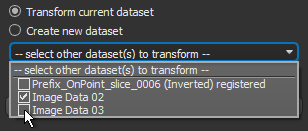
NOTE Only equivalent datasets that have the same number of slices in the image stack will be shown in the drop-down menu.
- Do one of the following:
- Click the OK button to apply the registration to the selected dataset(s).
- Click the Cancel button to exit Slice Registration without applying any changes.